Building a Desktop Receipt Pipeline: Tesseract, Local LLMs, and Hybrid Extraction in PyQt6
A walkthrough of stitching Tesseract OCR, a local NuExtract-tiny model, and a DeepSeek fallback into a PyQt6 desktop app. Threading, fuzzy business matching, and the hybrid extraction architecture.

Most OCR content on the web covers two scenarios: a one-shot script that dumps a PDF to text, or a cloud API call to AWS Textract. Neither maps to a real desktop workflow where someone sits down with a stack of receipts — invoices, grocery slips, restaurant bills, or expense reports — needs structured data (vendor, total, date, category), and wants the extraction to improve as they use the app.
This post walks through the architecture of a PyQt6 desktop receipt parser that combines Tesseract OCR with a local model (NuExtract-tiny) and a remote DeepSeek fallback. The key insight: none of these components is hard in isolation. The hard part is the seam work.
The Pipeline
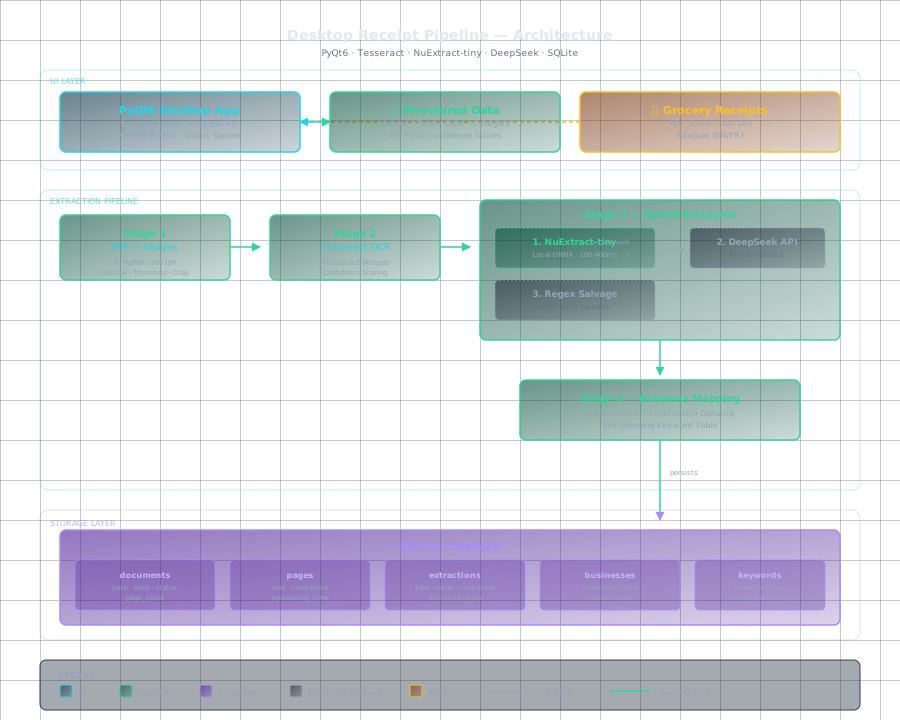
The extraction chain has four stages, each with a defined contract and a fallback path:
Stage 1: PDF to images. PyMuPDF renders each page at 300 DPI. The ImageProcessor deskews, thresholds, and crops to content. No OCR happens yet. This stage fails only if the PDF is corrupt, in which case the app surfaces "unreadable file" and logs the page number.
Stage 2: Tesseract OCR. The OCREngine wraps pytesseract with per-page confidence scoring. Low-confidence pages (< 60) get flagged for reprocessing with a different PSM mode. Tesseract is fast and runs locally, but its raw output is a wall of text with no structure.
Stage 3: Structured extraction. This is where the seam work lives. The raw text hits a hybrid extractor that tries three strategies in order:
-
NuExtract-tiny (local ONNX) — a 350M parameter model fine-tuned on invoice/receipt triples. It returns structured JSON (company, total, date, invoice number) plus per-field confidence. On a modern CPU it runs in 200-400ms per page. No network, no API key, no cost per call.
-
DeepSeek API (remote fallback) — if NuExtract returns any field below 70% confidence, the raw text gets sent to DeepSeek with a structured prompt. This adds 1-3 seconds but handles edge cases: handwritten totals, rotated scans, multi-currency amounts.
-
Regex salvage (last resort) — a set of hand-rolled patterns for total ($?\d+.\d{2}) and dates. Low confidence but better than a null response when the user needs to see something.
The hybrid approach means the app works fully offline for 80% of receipts. Only the ambiguous cases hit the network. No cloud dependency for the common path.
Stage 4: Business mapping. Extracted vendor names go through a FuzzyMatcher that compares against a local SQLite table of known businesses and keywords. Exact match passes through. Variant match ("Walmart" vs "Walmart Supercentre") scores by Levenshtein distance. Fuzzy match catches typos and abbreviations. The user confirms or corrects the match once; the app stores the keyword for next time. Over a few dozen receipts, the mapping converges and the user stops seeing prompts.
Threading Model
PyQt6 blocks the UI thread on long operations. OCR and LLM calls each run in their own QThread with a progress signal. The pipeline manager chains them: when Tesseract finishes, it emits the raw text, which triggers NuExtract on a second thread, which triggers DeepSeek on a third (if needed). The UI never freezes. A QProgressBar on the status bar shows "Page 3/12 — Extracting..." with a cancel button.
This is not novel threading. What makes it work in practice is the signal contract: every stage emits the same dataclass (PageResult with status, text, confidence, structured_data) so the next stage never parses a different shape. The pipeline is a state machine, not a chain of callbacks.
SQLite Schema Design
The local database holds five core tables that mirror the pipeline stages:
- documents — file path, hash (SHA-256 of raw bytes), page count, status
- pages — FK to document, page number, raw text, confidence, processing_time_ms
- extractions — FK to page, field name, value, confidence, source (nuxtract/deepseek/regex)
- businesses — canonical name, last_used, match_count
- business_keywords — FK to business, keyword, match_type (exact/variant/fuzzy)
The hash in documents doubles as deduplication: scan the same receipt twice and the app returns the cached result. No reprocessing.
What I Would Change
NuExtract-tiny is fast but its training data skews toward US receipts. Receipts with bilingual text (English + French) and mixed currency symbols confuse it more often than I expected. A fine-tuning run on a few hundred diverse business receipts would close the gap. That is the next step.
The other limitation is the Tesseract dependency. Bundling Tesseract with the app (via PyInstaller or Nuitka) adds 80MB to the distribution. NuExtract-tiny is ONNX and adds another 120MB. The tradeoff is a self-contained binary that works offline, but the download size is a conversion friction for casual users.
The Takeaway
A desktop receipt pipeline is not a machine learning problem. It is a systems integration problem. Tesseract handles the generic case. A small local model handles the structure. A remote API handles the edge cases. A well-designed database handles the learning. None of the pieces is state-of-the-art. Stitched together with clear contracts and proper threading, they produce something that beats any single approach.
The hybrid architecture pattern generalizes beyond receipts: any document processing workflow where 80% is routine and 20% needs human-level reasoning can use the same three-tier extraction strategy.