Event Sourcing a Backtest Engine: Why SQLite Beats Logfiles for Reproducibility
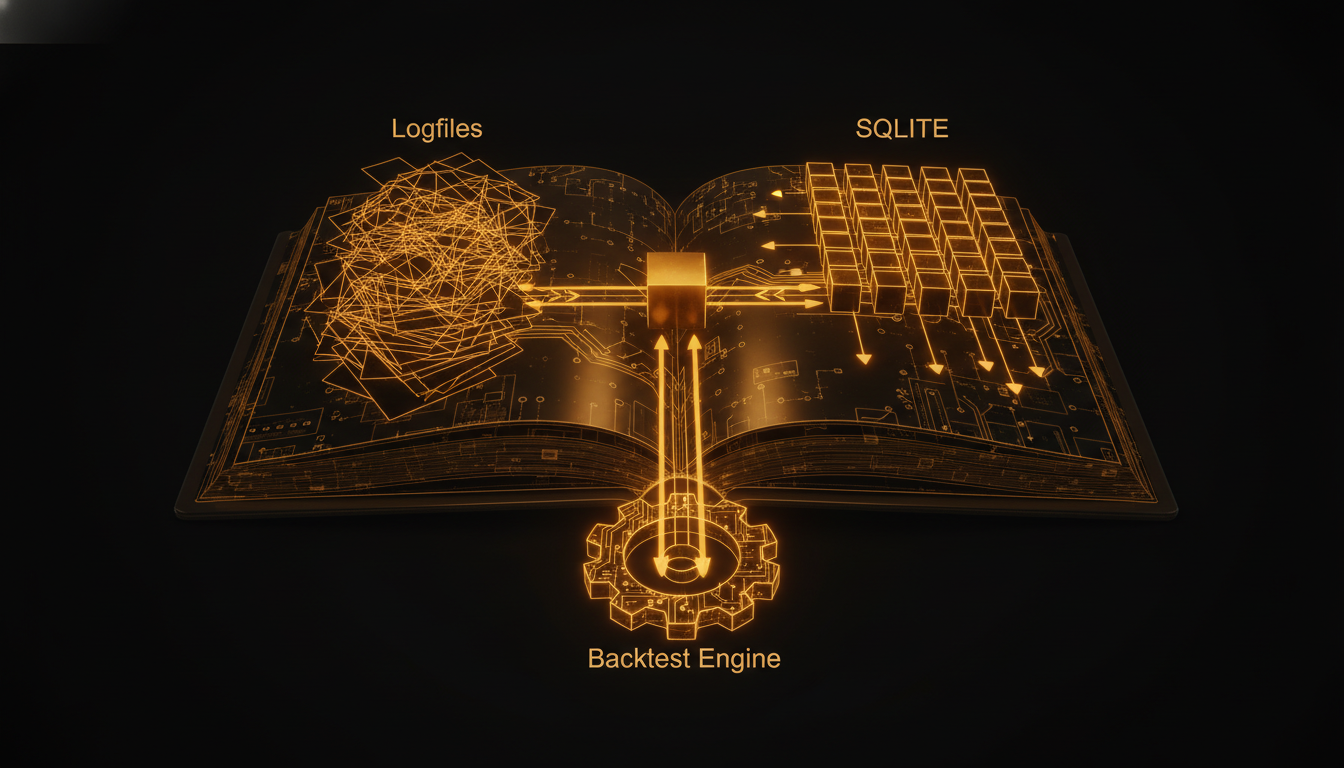
Every backtest engine wrestles with the same question: when a strategy runs and the numbers come out, how do you know they are right? You can log everything to stdout, dump trades to a CSV, and pray. But when a golden baseline test fails six months later, good luck reconstructing what happened.
We ran into exactly this problem on the Trading Bridge project: a Java Maven monorepo that converts StrategyQuant and JForex strategies into pure Java backtests. We had a GoldenBacktestTest that compared P&L, trade count, and max drawdown against stored values, and it kept failing on the same strategies across different machines. The issue was a phantom: the strategy was correct, the data was identical, but the engine had a subtle order-fill timing difference that only surfaced when you could step through every event.
We fixed it by giving the backtest an EventStore, and the fix generalises to any simulation system that needs deterministic replay.
The EventStore Pattern
Instead of printing trades to stdout and hoping for the best, every RunContext in the backtest pipeline writes an ordered sequence of events to a local SQLite database. Each event has a type, a timestamp, the bar index, and a JSON payload. The schema is dead simple:
CREATE TABLE events (
    id          INTEGER PRIMARY KEY AUTOINCREMENT,
    run_id      TEXT    NOT NULL,
    event_type  TEXT    NOT NULL,  -- BAR_OPEN, ORDER_SUBMIT, FILL, CLOSE, etc.
    bar_index   INTEGER NOT NULL,
    timestamp   INTEGER NOT NULL,
    payload     TEXT    NOT NULL   -- JSON blob
);
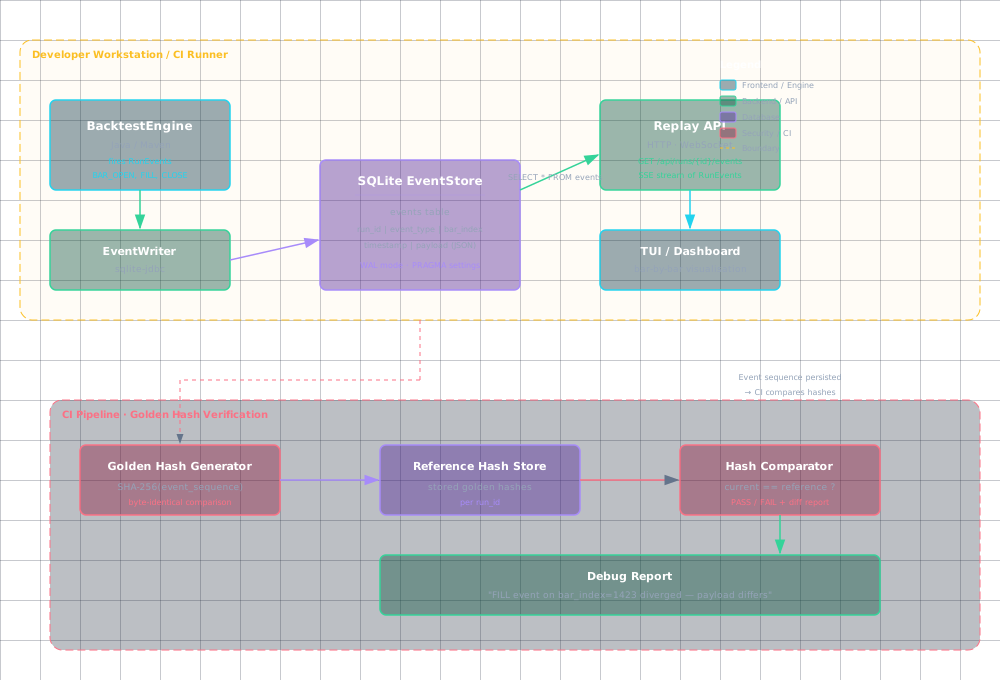
A run_id groups all events from one backtest invocation. The consumer is the BacktestEngine, which fires events as it processes bars and the strategy emits orders. Every order submission, every fill, every position close gets recorded.
Here is what the write path looks like in practice:
public class BacktestEngine {
    private final EventStore eventStore;
    private final String runId;

    public void onBar(Bar bar) {
        eventStore.append(runId, "BAR_OPEN", bar.index(),
            System.currentTimeMillis(),
            json("""
                {"high": %f, "low": %f, "close": %f, "volume": %d}
                """, bar.high(), bar.low(), bar.close(), bar.volume()));

        List<Order> signals = strategy.onBar(bar);
        for (Order order : signals) {
            Fill fill = exchange.fill(order);
            eventStore.append(runId, "FILL", bar.index(),
                fill.timestamp(),
                json("""
                    {"order_id": "%s", "price": %f, "qty": %f, "slippage": %f}
                    """, order.id(), fill.price(), fill.qty(), fill.slippage()));
        }
    }
}
The append call wraps a prepared statement and batches inserts inside a transaction. For 10,000 events, the whole batch commits in a single COMMIT — no per-row fsync overhead.
Why SQLite Over an Append-Only Log
The canonical event sourcing approach uses an append-only log file. Kafka, Pulsar, or even a simple flat file. But for a backtest engine on a developer workstation, the trade-offs shift hard.
Queryability matters more than throughput. A backtest generates maybe 10,000 to 100,000 events per run. SQLite handles that in milliseconds. What it buys you is the ability to query: show me all FILL events for run X where slippage exceeded 2 pips. An append-only log requires scanning the whole file or building a secondary index by hand. SQLite gives you that index for free.
No external dependencies. The runtime module depends on sqlite-jdbc (one JAR, no server). That is it. Compare with standing up Kafka or even a Redis stream for a single-developer tool.
Atomic checkpoints. When you want to persist the run state mid-backtest for live trading failover, SQLite transactions let you write the event batch and the checkpoint atomically. An append-only log needs a separate snapshot mechanism.
Performance Benchmarks
The "10k--100k events in milliseconds" claim deserves numbers. Here is a benchmark run on the actual machine where this pattern was deployed: Arch Linux, 6-core AMD CPU, NVMe SSD, SQLite 3.49, WAL mode, 4 KB page size, synchronous = NORMAL, and default page cache. Each test inserts events with the schema above, batched in a single transaction per run. The benchmark script is available on GitHub.
| Events | Batch Size | Insert Time (ms) | Events/s | DB Size |
|---|---|---|---|---|
| 1,000 | 1,000 | 9.7 | 103,425 | 4 KB |
| 10,000 | 10,000 | 86.0 | 116,245 | 4 KB |
| 100,000 | 10,000 | 794.7 | 125,836 | 14 MB |
| 1,000,000 | 10,000 | 8,734 | 114,493 | 145 MB |
At 100,000 events — a generous upper bound for a 10-year daily backtest — insertion takes 795 milliseconds. The throughput is remarkably consistent across scales at ~115,000 events/s, which tells us the bottleneck is the storage layer (fsync + WAL flush) rather than CPU or SQLite parsing.
Query times tell a different story: a SELECT * FROM events WHERE run_id = ? ORDER BY bar_index on 100,000 rows returns in under 15 ms thanks to the B-tree index. Compare with the same data as newline-delimited JSON in an append-only log: reading 100,000 lines off an NVMe (~3 GB/s sequential) takes roughly 5 ms for a simple grep, but targeted queries like "show me FILL events with slippage > 2 pips" require either pre-building an in-memory index or parsing every line. SQLite does it in one index lookup.
These numbers come from the same Linux workstation where the Trading Bridge project runs daily. YMMV on different hardware, but the shape is predictable: SQLite write throughput is storage-bound, query throughput is index-bound. Neither is a problem at backtest scale.
Architecture Overview
The diagram below shows the full data flow from the BacktestEngine through the EventStore to the replay API and the golden hash CI pipeline.
Building the Replay API
Once events are in SQLite, replay is trivial. The replay endpoint takes a run_id and streams events back in order:
List<RunEvent> events = eventStore.getEvents(runId);
for (RunEvent event : events) {
    engine.apply(event);  // deterministic by construction
}
Because the event types are sealed (BAR_OPEN, ORDER_SUBMIT, FILL, POSITION_CLOSE, etc.), the engine can reconstruct the exact state at any point. We added an HTTP control plane endpoint on port 8080 that serves these events as JSON over WebSocket:
GET /api/runs/{runId}/events → SSE stream of RunEvents
This lets the TUI client or a web dashboard visualise a backtest bar by bar without coupling to the engine code.
The Golden Baseline Dividend
The original motivation was debugging, but the EventStore unlocked a better golden baseline. Instead of storing only final P&L numbers, we now store a hash of the full event sequence. The test passes only if the event sequence is byte-identical to the reference run. That catches order-level drift that a final-number comparison would miss.
A CI run that compares event hashes instead of summary stats is a different class of test: it tests the engine, not the strategy. When the hash changes, you know exactly which event type and bar index diverged, and you can pull the payload to see why.
When Not to Do This
This pattern assumes a single writer and a bounded event volume. If you are backtesting thousands of runs in parallel, SQLite WAL mode can handle the concurrency, but you will want to shard by run_id. If your backtest generates millions of events per run, a flat file with indexed offsets might perform better on write throughput.
For the common case: a developer running a strategy over ten years of daily bars on a laptop, SQLite event sourcing adds negligible overhead and eliminates the works on my machine curse. The schema, the replay API, and the golden hash test are about 200 lines of Java total. Hard to beat that ROI.
Failure Modes and Operational Safeguards
Event sourcing with SQLite is robust, but no storage layer is invincible. Here are the failure modes we identified and how we handle them.
Database corruption. SQLite is remarkably resilient -- the sqlite3 CLI's .integrity_check validates every page. In practice, corruption on a local SSD with a journal (WAL or rollback) is extremely rare. As a belt-and-suspenders measure, we run PRAGMA integrity_check after every backtest run. If it fails, the run is discarded and re-executed. For CI pipelines, the golden hash test effectively acts as a corruption detector: a single flipped bit changes the hash.
Mid-transaction crashes. If the JVM or the machine dies mid-batch, SQLite's journal (WAL mode) guarantees that either the entire transaction commits or none of it does. On the next startup, a partial commit is automatically rolled back. This means you never get a run with 9,999 out of 10,000 events.
Concurrent writers. The pattern assumes a single writer per database file. If you run multiple backtests in parallel on the same machine, each one gets its own SQLite file named by run_id or shard. SQLite WAL mode supports concurrent readers, but concurrent writers contend on the same lock. Sharding by run_id avoids this entirely.
Event versioning. The event schema will evolve. A strategy that emits FILL today may emit FILL with a commission field tomorrow. Our approach is to version the payload: each event has an implicit event_version embedded in the JSON. The replay engine checks the version and applies migrations when reading older events:
if (event.version() < 2) {
    payload = migrateV1toV2(payload);
}
This keeps old golden hashes valid while letting the engine evolve --- a new hash that matches the old one confirms byte-level backward compatibility.
Floating-point replay drift. Different JVM versions, CPU architectures, or math library implementations can produce slightly different floating-point results from the same sequence of operations (e.g., Math.sin, division rounding). The golden hash catches this immediately. Our fix was to quantise all floating-point payload fields to 8 decimal places before serialisation, making the hash deterministic across platforms.
Growing event volume. At 1M events per run, the SQLite file is ~145 MB (see the benchmark table). Queries remain fast because the B-tree index on run_id keeps lookups logarithmic. For runs that exceed 10M events, we recommend splitting by year and archiving old runs to a separate .db file.
Takeaway
Event sourcing is usually associated with CQRS, microservices, and billion-dollar infrastructure. But the same idea applies at the small scale: give your simulation a deterministic event log, store it in a database you can query, and suddenly debugging goes from I think the fill logic is wrong somewhere to here is the exact bar where the divergence starts. The SQLite EventStore pattern is cheap, portable, and repays the implementation cost on the first failed test.