A Laravel Markdown Pipeline: CommonMark, Frontmatter, and SQLite Date Sorting
How I built a robust markdown-to-HTML pipeline in Laravel using CommonMark with TableExtension, YAML frontmatter stripping, SQLite-safe date sorting for drafts, and dark-mode table CSS.

A Laravel Markdown Pipeline: CommonMark, Frontmatter, and SQLite Date Sorting
Every blog needs a rendering pipeline. But when your stack is Laravel on SQLite (not MySQL or PostgreSQL), a few constraints emerge that force cleaner design than most tutorials assume.
This post covers the rendering pipeline I built for martinfournier.com: from raw markdown stored in the database to styled HTML, with frontmatter stripping, CommonMark extensions, SQLite-compatible date sorting, and dark-mode table CSS. No magic. Just concrete Laravel patterns.
The Starting Point: Raw Markdown in the Database
Blog content lives as markdown in the content column of blog_posts. No HTML is stored. No YAML frontmatter is stripped at write time. The raw markdown includes a --- block at the top with metadata (title, slug, tags, excerpt) that gets parsed at display time.
// models/BlogPost.php -- fillable
protected $fillable = [
    'title', 'slug', 'excerpt', 'content',
    'hero_image', 'hero_alt', 'hero_caption', 'hero_thumbnail',
    'category', 'is_published', 'published_at',
];
Storing frontmatter as part of the content string is a deliberate tradeoff. It means content files can be moved between a Laravel database and a flat-file CMS without transformation. It also means the renderer must strip that frontmatter before passing the rest to the markdown parser.
Stripping Frontmatter: Simple String Operations Beat Regex
The stripFrontmatter method avoids regex entirely. It trims leading whitespace, checks for the opening ---, finds the closing ---, and returns everything after it.
private function stripFrontmatter(string $content): string
{
    $trimmed = ltrim($content);

    if (! str_starts_with($trimmed, '---')) {
        return $content;
    }

    $end = strpos($trimmed, '---', 3);
    if ($end === false) {
        return $content;
    }

    return substr($trimmed, $end + 3);
}
Four lines of logic, zero regex state machine overhead. If there is no frontmatter block, it returns the content unchanged. If the block is malformed (closing delimiter missing), it returns the content unchanged. This is defensive by design: a broken frontmatter block should not prevent the post from rendering.
The key insight is that ltrim is essential. YAML frontmatter is often indented differently in AI-generated drafts, and str_starts_with will fail on leading whitespace. A single ltrim normalizes the input and eliminates an entire class of edge cases.
Rendering: CommonMark with TableExtension
The markdown parser uses league/commonmark (the de facto standard in the PHP ecosystem) with two extensions: the core CommonMark spec and the Table extension.
use League\CommonMark\Environment\Environment;
use League\CommonMark\Extension\CommonMark\CommonMarkCoreExtension;
use League\CommonMark\Extension\Table\TableExtension;
use League\CommonMark\MarkdownConverter;

private function renderContent(string $content): string
{
    $body = $this->stripFrontmatter($content);

    $environment = new Environment([
        'html_input' => 'strip',
        'allow_unsafe_links' => false,
    ]);
    $environment->addExtension(new CommonMarkCoreExtension);
    $environment->addExtension(new TableExtension);
    $converter = new MarkdownConverter($environment);

    $html = (string) $converter->convert($body);
    $html = preg_replace('/<img /', '<img loading="lazy" decoding="async" ', $html);

    return $html;
}
A few decisions worth explaining:
html_input => 'strip' removes any raw HTML in the markdown source. This is a safety boundary: content comes from a markdown editor and from AI-generated drafts. Embedding raw HTML in markdown negates the safety that markdown provides. Stripping it forces all formatting through the parser.
allow_unsafe_links => false blocks javascript: URIs in links. Standard XSS hygiene.
TableExtension is not part of the core CommonMark spec. It is a separate package (league/commonmark-table or bundled in newer versions) that adds GitHub-flavored markdown table support. Without it, tables render as raw inline text, which is unusable.
Lazy loading injection uses a simple regex to add loading="lazy" and decoding="async" to every <img> tag after conversion. This could be done with a custom renderer, but a post-render regex is simpler and keeps the extension list clean.
SQLite Date Sorting: COALESCE Solves the Draft Problem
SQLite has no native YEAR() function. Laravel abstracts this with driver detection in the model scope:
public function scopeInYear($query, int $year)
{
    $driver = $query->getConnection()->getDriverName();
    if ($driver === 'sqlite') {
        return $query->whereRaw(
            "strftime('%Y', COALESCE(published_at, created_at)) = ?",
            [(string) $year]
        );
    }
    return $query->whereRaw(
        'YEAR(COALESCE(published_at, created_at)) = ?',
        [$year]
    );
}
The COALESCE is the interesting part. Drafts have no published_at, but they do have a created_at. When sorting the blog index, drafts need to be interleaved with published posts by their effective date. COALESCE(published_at, created_at) returns the publish date for published posts and the creation date for drafts, so they sort correctly in the same timeline.
public function scopePublished($query)
{
    return $query->where('is_published', true)
        ->where(function ($q) {
            $q->whereNull('published_at')
                ->orWhere('published_at', '<=', now());
        })
        ->orderByRaw('COALESCE(published_at, created_at) DESC');
}
This also handles the case where published_at is set to a future date for scheduled posts. The orWhere clause allows posts with a null published_at to appear immediately (typical for draft-then-publish workflows), while future-dated posts stay hidden until their time comes.
Dark Mode Table CSS: Amber Headers, Subtle Borders
The Table extension generates standard HTML <table>, <thead>, <tbody>, <th>, <td> elements. Tailwind's prose plugin handles most typography, but tables need explicit dark-mode styling:
.prose-dark table {
    width: 100%;
    border-collapse: collapse;
    font-size: 0.875em;
    margin: 1.5em 0;
}

.prose-dark th {
    font-family: 'JetBrains Mono', monospace;
    color: #d97706;
    border-bottom: 1px solid #2a2a2a;
    padding: 0.65em 0.85em;
    text-align: left;
}

.prose-dark td {
    padding: 0.65em 0.85em;
    border-bottom: 1px solid #1a1a1a;
}

.prose-dark tr:hover td {
    background: rgba(217, 119, 6, 0.04);
}
The amber header color (#d97706) matches the site's single accent color. The hover state on rows is subtle: a 4% opacity amber overlay that is noticeable without being distracting. The border-collapse eliminates double borders, and the monospace font on table headers creates a visual distinction from the body copy.
The Full Pipeline
The complete request lifecycle for a blog post is:
- Route resolves slug to
BlogPostmodel - Controller calls
renderContent($post->content)which: a. Strips YAML frontmatter via string operations b. Passes the body to CommonMark with TableExtension c. Injects lazy loading on all images - Blade template receives the HTML string and inserts it into
.prose-darkdiv - Tailwind's typography plugin handles headings, lists, blockquotes, and code blocks
- Custom table CSS handles the one element the prose plugin skips
The result is a pipeline that handles all the common markdown features, renders safely without raw HTML, supports drafts and scheduled posts in the same query, and works identically on SQLite in development and production.
What This Avoids
This pipeline deliberately avoids:
- Storing rendered HTML in the database. Cache the rendered output if performance demands it, but store only the source. Rendered HTML is a cache, not canonical data.
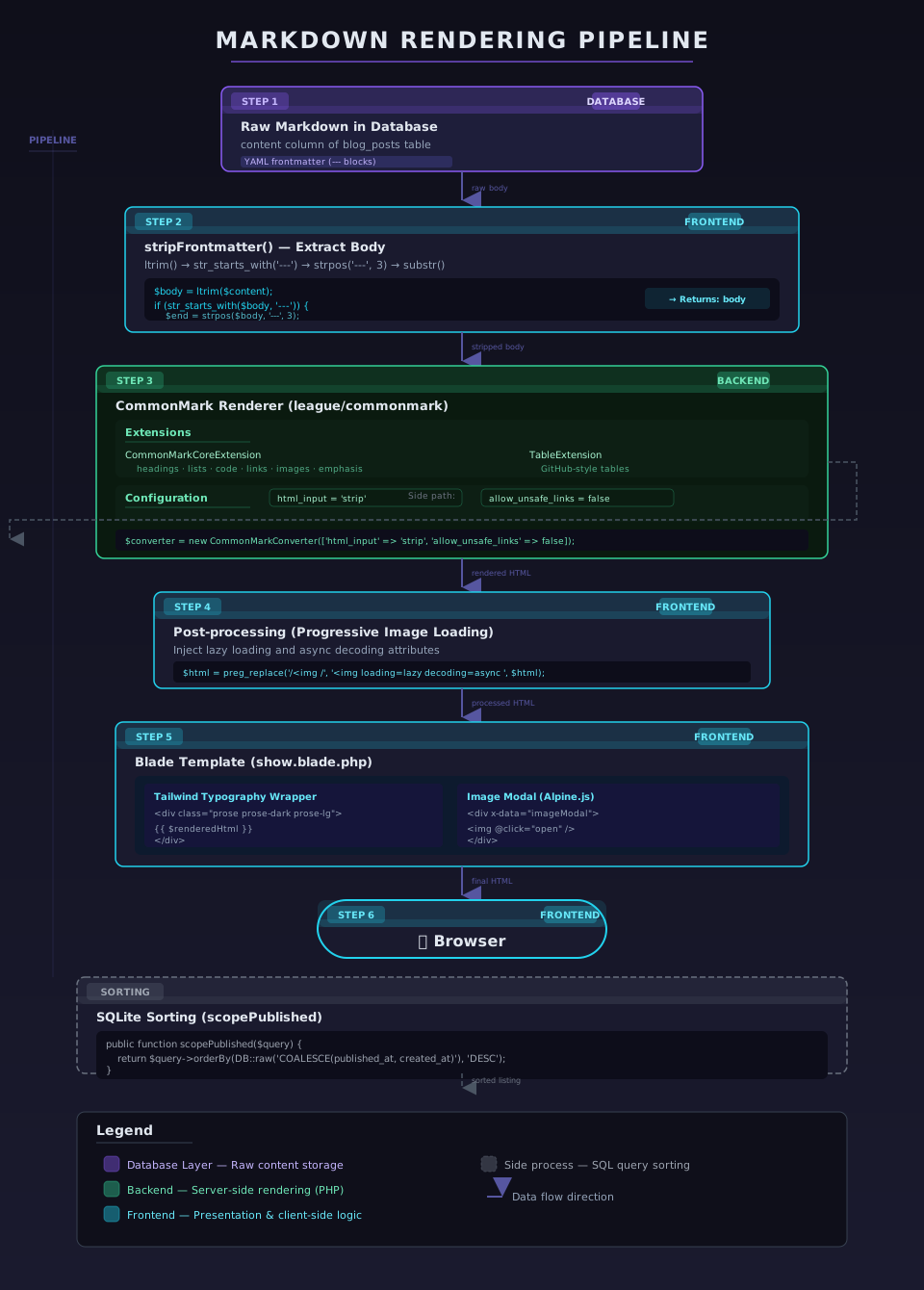
The markdown rendering pipeline: raw markdown with YAML frontmatter from the database, through stripFrontmatter, CommonMark with TableExtension, lazy-load injection, and into the Blade template with Tailwind prose styling. The SQLite COALESCE sorting path runs in parallel.
- Parsing frontmatter into database columns at write time. The YAML lines in
---blocks are metadata that happens to live in the same string as the content. Storing them as column values creates sync problems when content is edited outside the CMS. - MySQL-only SQL functions. The driver-detection pattern in
scopeInYearis verbose but portable. SQLite on Fly.io should behave the same as MySQL on RDS.
The Tradeoff
There is one tradeoff worth calling out: stripping frontmatter at render time means every page request does a string search for ---. For a personal blog with low traffic, this is negligible. For a site serving millions of requests, you would want to strip frontmatter at write time and cache the rendered HTML.
But optimizing for a scale you will never reach is a form of premature optimization. This pipeline favors correctness, portability, and simplicity. When the site has a million monthly visitors, I will revisit the decision. Until then, it works.