Three Bugs Before Breakfast: Integrating Flutter with Google Health Connect
A walk through three sequential bugs that blocked a Flutter app from reading Google Health Connect data, how each was discovered, and what the health package v13.3.1 actually needs from your AndroidManifest.

The One-Tap Export Dream
I wanted a simple Android app that does one thing: tap a button, read health data from Google Health Connect, and upload it to my personal health dashboard. Steps, calories, heart rate, weight, sleep, HRV -- all the metrics my Garmin and Arboleaf devices collect.
The app itself is minimal: 5 Dart files, one screen, a settings page for the API token. The dependencies are straightforward: health: ^13.3.1 (Flutter's Health Connect SDK wrapper, 668+ stars), http, intl, and shared_preferences.
What followed was three sequential bugs, each one blocking the next. The full saga is documented in DEBUG.md in the repo.
Bug #1: The Invisible App
Symptom: The APK installed fine (47MB in App Info). But hermes_health_connect never appeared in Health Connect's "App permissions" screen. The requestAuthorization() call returned false silently. No permission dialog ever appeared.
Root cause: Three missing pieces in AndroidManifest.xml.
First, Health Connect requires a <queries> block that declares the app wants to detect the com.google.android.apps.healthdata package. Without this, Android prevents the app from finding Health Connect at all.
Second, the app's main activity needs an ACTION_SHOW_PERMISSIONS_RATIONALE intent-filter. This is how Health Connect launches its permission rationale screen.
Third, there must be a health_connect_config.xml file in res/xml/ that lists the data types the app intends to read. Without it, Health Connect does not know what permissions to offer.
Fix: I created a Python script (scripts/add_health_connect_manifest.py) that patches the CI-generated AndroidManifest.xml to add all three things:
# Simplified: adds queries block, intent-filter, and meta-data
tree.getroot().insert(0, queries_element)
activity.append(intent_filter_element)
application.append(meta_data_element)
Also created android/app/src/main/res/xml/health_connect_config.xml listing all data types (STEPS, ACTIVE_ENERGY_BURNED, WEIGHT, SLEEP, etc.) in the <health-connect-imported-data-types> format.
Bug #2: Silent Permission Failure
Symptom: The app appeared in Health Connect's app list now. But tapping "Export Data" still showed "Permissions required. Please grant access in Health Connect & tap Retry." The requestAuthorization() call still returned false without any error message. The Health Connect permission UI never opened.
Root cause: The health Flutter package v13.3.1 requires explicit <uses-permission> declarations in AndroidManifest.xml for each data type. From the official docs: "For each data type you want to access, the READ and WRITE permissions need to be added to the AndroidManifest.xml file."
Without these, Health Connect's runtime requestAuthorization() call silently returns false because Android cannot grant permissions it does not know about.
Twelve missing permissions discovered:
android.permission.health.READ_STEPSandroid.permission.health.READ_ACTIVE_ENERGY_BURNEDandroid.permission.health.READ_RESTING_HEART_RATEandroid.permission.health.READ_WEIGHTandroid.permission.health.READ_BODY_FATandroid.permission.health.READ_HEART_RATE_VARIABILITYandroid.permission.health.READ_SLEEPandroid.permission.health.READ_DISTANCEandroid.permission.health.READ_HEART_RATEandroid.permission.health.READ_HEIGHTandroid.permission.health.READ_HEALTH_DATA_HISTORYandroid.permission.ACTIVITY_RECOGNITION
How discovered: I scraped the health package documentation from pub.dev/packages/health which showed the uses-permission requirements in the "Android Setup" section. The Flutter plugin documentation is thorough but easy to miss if you are not looking at the right page.
Fix: Updated the manifest patching script to insert all 12 <uses-permission> elements.
Bug #3: "App Update Needed" Error
Symptom: After the permissions fix, Health Connect now showed hermes_health_connect in its list but with an "App update needed" banner: "needs to be updated to continue syncing with Health Connect. Check for updates."
Root cause: The CI workflow was forcing a wrong Gradle dependency as a manual override:
// WRONG -- what CI was doing:
implementation("androidx.health:health-connect-client:1.1.0")
But the health plugin v13.3.1 internally declares a different Maven coordinate:
// CORRECT -- what the health plugin's android/build.gradle uses:
implementation("androidx.health.connect:connect-client:1.2.0-alpha02")
Two different artifacts:
| CI override (removed) | Plugin internal | |
|---|---|---|
| Group | androidx.health |
androidx.health.connect |
| Artifact | health-connect-client |
connect-client |
| Version | 1.1.0 |
1.2.0-alpha02 |
The manual 1.1.0 override in the app-level build.gradle.kts created a version and location conflict that Health Connect detected at runtime, causing it to reject the app's integration as outdated. Think of it as installing the wrong driver for a device -- the system knows something is off and refuses to work with it.
How discovered: I downloaded the health package tar.gz from pub.dev (https://pub.dev/packages/health/versions/13.3.1.tar.gz) and extracted android/build.gradle to find the actual dependency declaration.
Fix: Removed the manual dependency override from the CI workflow. The health plugin's own android/build.gradle already correctly pulls in connect-client:1.2.0-alpha02. The CI only needs to set SDK versions:
compileSdk: 36
minSdk: 26
targetSdk: 36
The CI Flow
Every push to master triggers a GitHub Actions workflow that:
- Checks out the repo and sets up Flutter (stable channel)
- Generates fresh Android platform files via
flutter create --platforms=android . - Patches
compileSdk/minSdkto 36/26 - Runs the Python manifest patcher (adds queries, permissions, config XML)
- Builds a release APK with
--dart-define=HEALTH_API_TOKEN=${{ secrets.HEALTH_API_TOKEN }} - Uploads the APK as a build artifact
The CI generates fresh Android files each run because flutter create is idempotent -- every patch script starts from a clean state.
The API Token Workflow
The app authenticates with the Hermes-Web server via Bearer token, with three ways to set it:
-
Runtime (preferred): Open the app, tap the gear icon, enter your token. Test Connection pings
GET /api/health/ping. Save persists viashared_preferences. No rebuild needed. -
Build-time (fallback):
String.fromEnvironment('HEALTH_API_TOKEN'), baked at build time. Used if no saved token exists. -
Web Admin: Hermes-Web has an admin page at
/admin/health/api-keysfor generating and revoking tokens. The server hashes tokens with SHA256 before storing.
The server-side middleware VerifyHealthToken hashes every incoming Bearer token and matches it against the health_api_keys table. The GitHub secret HEALTH_API_TOKEN must match the server's HEALTH_IMPORT_TOKEN or the server returns HTTP 401.
What I Learned
Three bugs, each with a different flavor:
Bug #1 was missing boilerplate -- the Android manifest entries that Health Connect expects but flutter create does not generate. This is a documentation gap, not a code bug. The fix is a patching script that runs after scaffold.
Bug #2 was missing permissions -- not a code issue either. The health package requires 12 permissions in the manifest, and there is no error message when they are absent. The requestAuthorization() call just returns false silently. Android has a convention that if a permission is not declared in the manifest, the runtime cannot grant it -- but the error path in this case is completely opaque.
Bug #3 was an incorrect Gradle dependency -- actively harmful, not just missing. The CI was overriding the plugin's internal dependency with a different artifact coordinate. This one was the hardest to debug because the error message ("App update needed") pointed away from the real cause.
Architecture
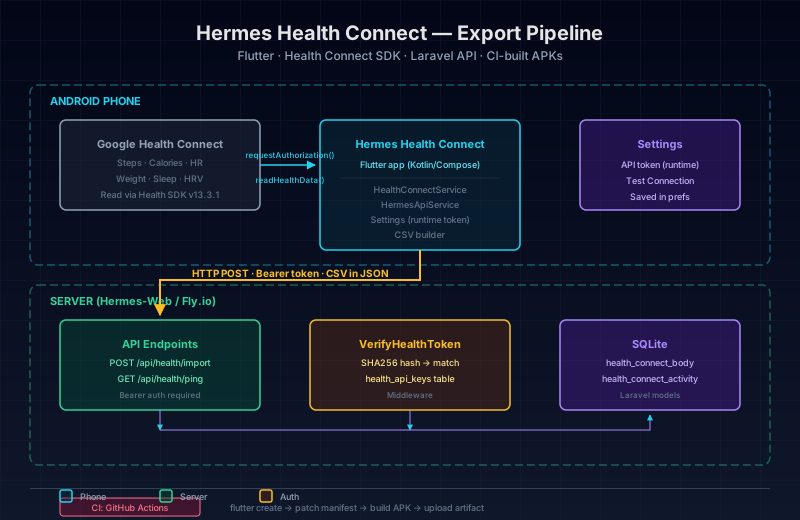
The app itself is simple: 5 Dart files in lib/, 3 screens, 2 services. The complexity is entirely in the Android integration layer -- manifest declarations, SDK compatibility, and Gradle dependency management.
The Takeaway
Integrating with platform SDKs from Flutter is easier than native Android, but not by much. The health package abstracts the Health Connect API well at the Dart level, but the Android boilerplate is still your responsibility. The three bugs I hit were all in the Android manifest and build configuration, not in the Dart code.
For anyone building a Health Connect app with Flutter, my advice is:
- Read the
healthpackage's full Android setup documentation before writing code - Start with a scaffold script that generates all manifest entries -- do not add them manually
- Do not add manual Gradle dependency overrides unless you have verified the plugin's internal dependencies
- Test on a real device, not just the emulator -- the emulator may not have Health Connect installed
The app works now. One tap exports the last 30 days of health data to the server. The build artifacts are on GitHub Actions for any device that needs a fresh install.
The code is at github.com/martinfou/hermes-health-connect. The full bug chronology with code snippets is in DEBUG.md in the repository.